
Key takeaways
- Finding waste is easy. Acting on dozens of recommendations is where teams stall
- Overwhelm, unclear priorities, and no feedback loop kill implementation momentum
- Guided walkthroughs break optimization into focused, one-at-a-time decisions
- Verification and progress tracking close the gap between 'found' and 'fixed'
Three months later, the spreadsheet is still open in a browser tab nobody has looked at since week one. A few of the easy wins got done. Most of the list is exactly where you left it.
The gap between knowing what to fix and actually fixing it is one of the most common and least talked about problems in cloud cost optimization, and it has more to do with workflow design than with discipline.
Why Recommendations Die
Finding waste is the easy part. Every major cloud provider and third-party tool can hand you a list of things to fix. The hard part is what happens next.
Here's why those lists almost never get fully implemented:
The Overwhelm Problem
A list of forty-seven recommendations reads less like a plan and more like a backlog nobody agreed to. Where do you start? How long will this take? Is any single item even worth the effort? When everything looks equally important, the default response is to defer the whole list until a quieter week that never arrives.
The Priority Problem
Even if you push past the initial overwhelm, you're stuck making judgment calls with incomplete context. Should you tackle the $200/month NAT Gateway first because it's easy, or the $50/month EC2 instance because there are twelve of them? Without clear guidance on effort versus impact, teams spend more time deciding what to do than actually doing it.
The Verification Problem
You deleted the resource. You think. Did it actually work? Is the cost gone from next month's bill, or did you miss a dependency? Most optimization tools tell you what to fix but never close the loop. There's no confirmation, no proof that your work had the intended effect. That uncertainty quietly erodes confidence.
The Momentum Problem
Even when you do knock out a few items, there's no sense of progress. You went from forty-seven recommendations to forty-three. The list barely looks different. Without visible forward motion, the motivation that got you started fades, and the remaining items slip back into "we'll get to it eventually" territory.
What If It Worked Like This Instead?
Handing someone a long list and expecting them to self-organize their way through it is a workflow set up to fail, no matter how disciplined the team is.
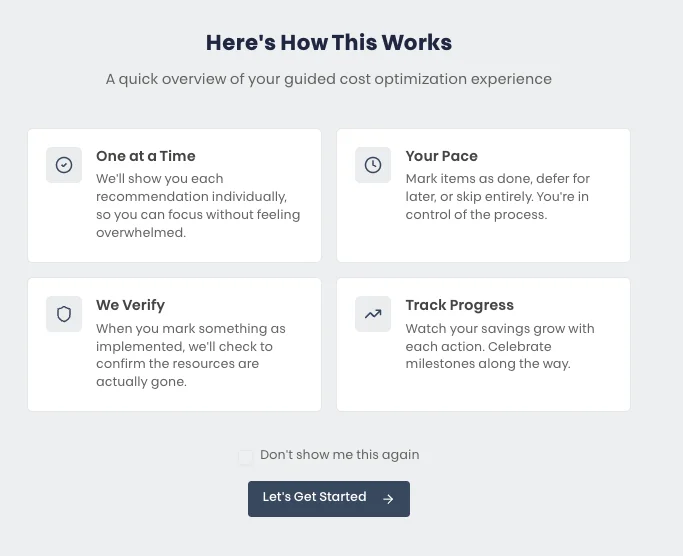
That is the idea behind guided cost optimization, and it rests on four principles that directly address why recommendations die.
Four Principles That Actually Work
One at a Time
Instead of a list of forty-seven, you see one recommendation. One clear description of the problem, one proposed change, one decision to make. Implement it, defer it for later, or skip it entirely. Then move on to the next one.
Your Pace
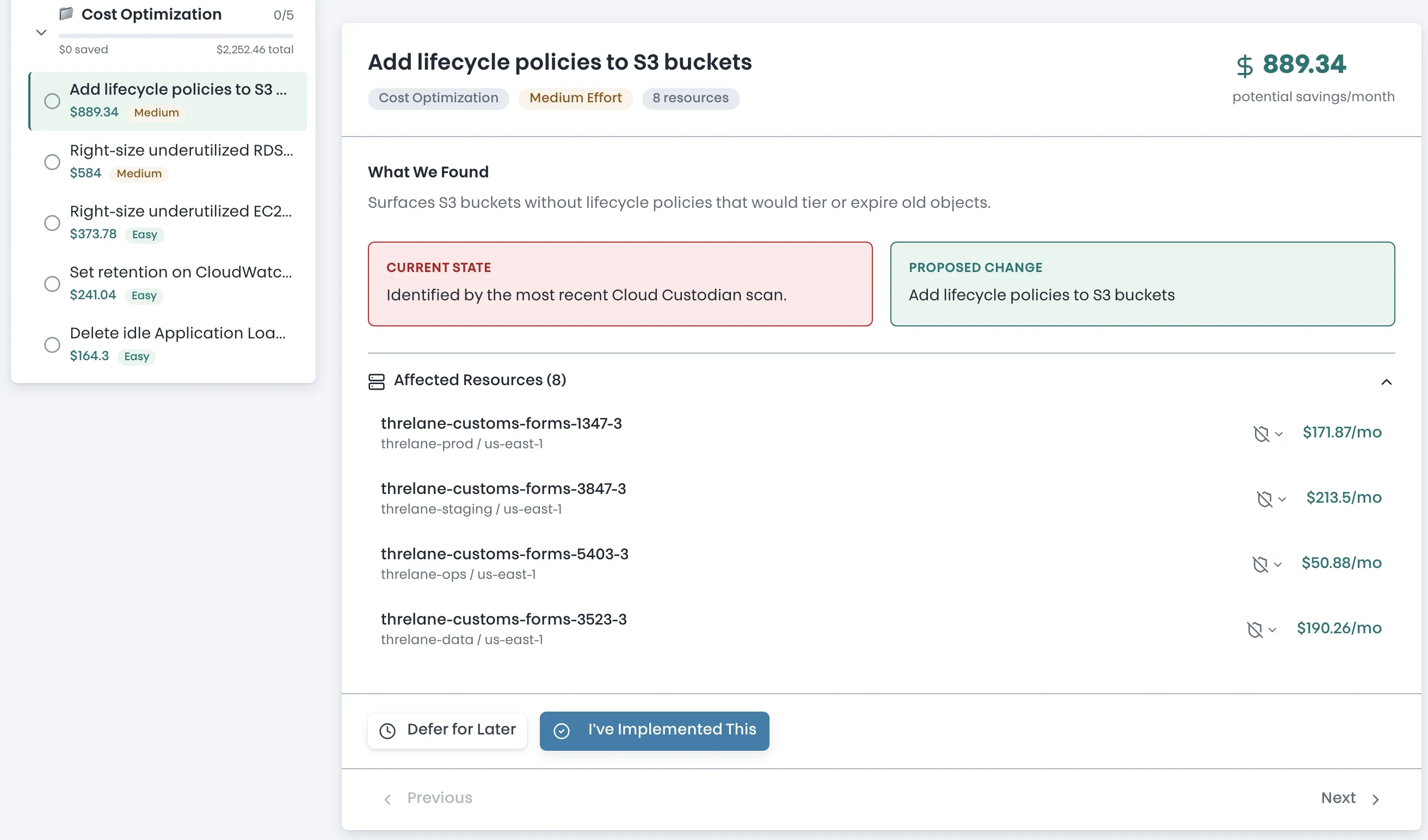
Not every recommendation needs to be acted on today. Some require a change window. Some need approval from another team. Some just aren't a priority this quarter.
A guided approach lets you defer items without losing them, skip items you've already addressed through other means, and come back to the deferred ones when the timing is right. You control the pace. Nothing falls through the cracks.
We Verify
This is the principle that carries the other three. When you mark a recommendation as implemented, the system does not take your word for it. It checks the actual AWS resources and confirms whether the change went through.
No more wondering if you got the right instance. No more waiting until next month's bill to see if it worked. Immediate, concrete confirmation that your action had the intended effect. That feedback loop is what turns a to-do list into a reliable process.
This is the part that sticks
Verification is what separates a workflow from a wish list. When the platform confirms the resource is actually gone, you stop second-guessing and start trusting the process, and a process you trust is one you'll actually finish.
Track Progress
Every implemented recommendation adds to a running total of savings. You can see exactly how much you've saved so far, how much is still on the table, and how each category (compute, storage, networking, database) is progressing.
It sounds simple, but visible progress is a powerful motivator. When you can see that the last three decisions saved your team $400/month, the next decision feels less like a chore and more like momentum.
The Momentum Effect
Something useful happens when you combine these four principles. Each small action (deleting an idle instance, cleaning up an orphaned volume) builds on the last one. The savings counter ticks up. The progress bar moves forward. You start looking for the next quick win because the last one felt good.
This is the opposite of spreadsheet fatigue. Instead of staring at a static list that barely changes, you are moving through a workflow that rewards every decision, for the same reason fitness apps celebrate your first mile and budgeting tools congratulate you on paying off a card. Small wins compound.
Teams that work through recommendations this way implement more of them, and they come back to finish what they deferred, because the workflow remembers the deferred items for them.
Turn your recommendations into momentum
Run a free read-only scan and work through what it finds one guided decision at a time.
From Report to Results
The old way looks something like this: run a scan quarterly, export the results to a spreadsheet, assign items to team members in a standup, check back in a month, find that half the items are still open, repeat.
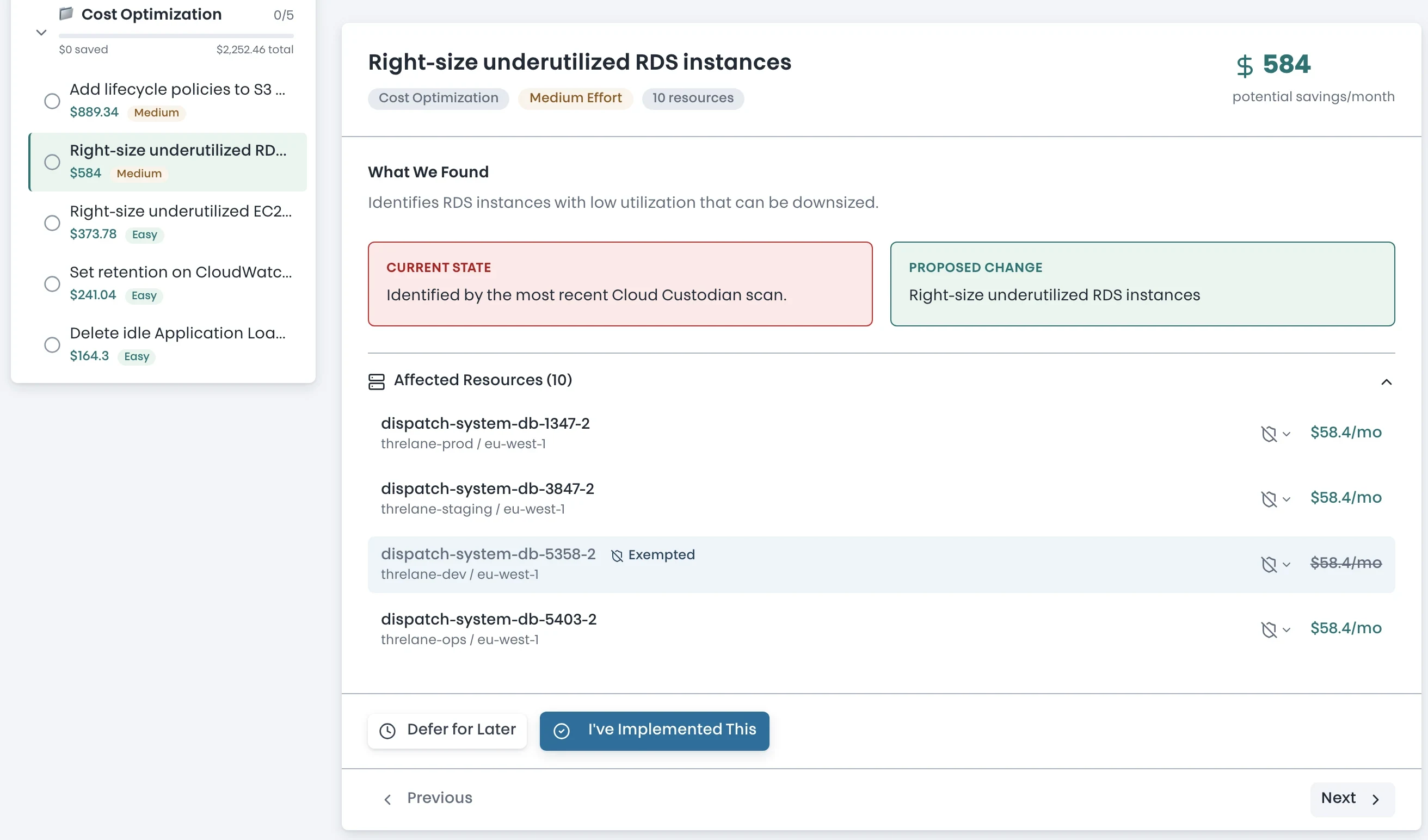
The guided approach starts from the opposite end. Every recommendation comes with context: what was found, what it is currently costing, and exactly what needs to change. Each one is tagged by effort level so you know what you are getting into before you commit an afternoon to it. And every decision you make is tracked, verified, and reflected in your overall progress.
A quarterly report and a guided walkthrough contain the same findings. The difference is that only one of them still works when you are busy, distracted, and carrying forty-six other things on your plate.